
Choosing the right web browser can feel like picking the perfect tool for your digital lifestyle. With so many choices, it can be tough to decide which one truly fits your needs.
Are you all about speed, security, or maybe the best extensions? In the battle of Chrome vs Edge vs Firefox, each browser brings something unique to the table. But which one is right for you? We’ll dive into what makes each browser stand out.
You’ll discover how they handle your favorite websites, protect your privacy, and even save you time. Stick around to find out which browser wins your heart and makes your online experience smoother and more enjoyable!
Market Share Comparison
Google Chrome holds the largest market share among web browsers. It is fast and easy to use. Many people like its simple design. Microsoft Edgeis growing in popularity. It is built on the same technology as Chrome. Edge offers unique features like vertical tabs. This helps users organize better. Firefoxis known for its privacy features. It is the choice for users who value data protection. Firefox’s market share is smaller compared to Chrome and Edge.
Browsers constantly update their features. This keeps the competition alive. Users often switch browsers for a better experience. Each browser has its strengths. Choosing a browser often depends on personal needs. Some prefer speed, others choose privacy. Understanding these differences helps in making the right choice.
User Interface And Design
Chromeoffers limited customization. Users can change themes and backgrounds. Extensions add more features. Edgeallows more tweaks. You can change the toolbar and layout. Firefoxwins in customization. Users can change almost everything. Themes, colors, toolbar, and layout are flexible.
Chromeis simple. Easy to navigate. Many find it user-friendly. Edgeis clear but has more features. Takes a bit to learn. Firefoxis straightforward. Many options, yet easy to use. Simple menus guide users.
Performance And Speed
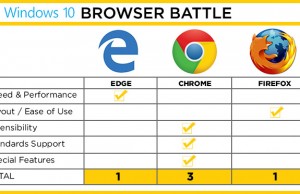
Chromeoften loads pages faster than other browsers. It uses advanced technology. Edgeis also quick but sometimes slower than Chrome. Firefoxhas improved speed. It is fast but not always. Each browser has its own strengths. Testing shows slight differences in load times. Speed can depend on the website.
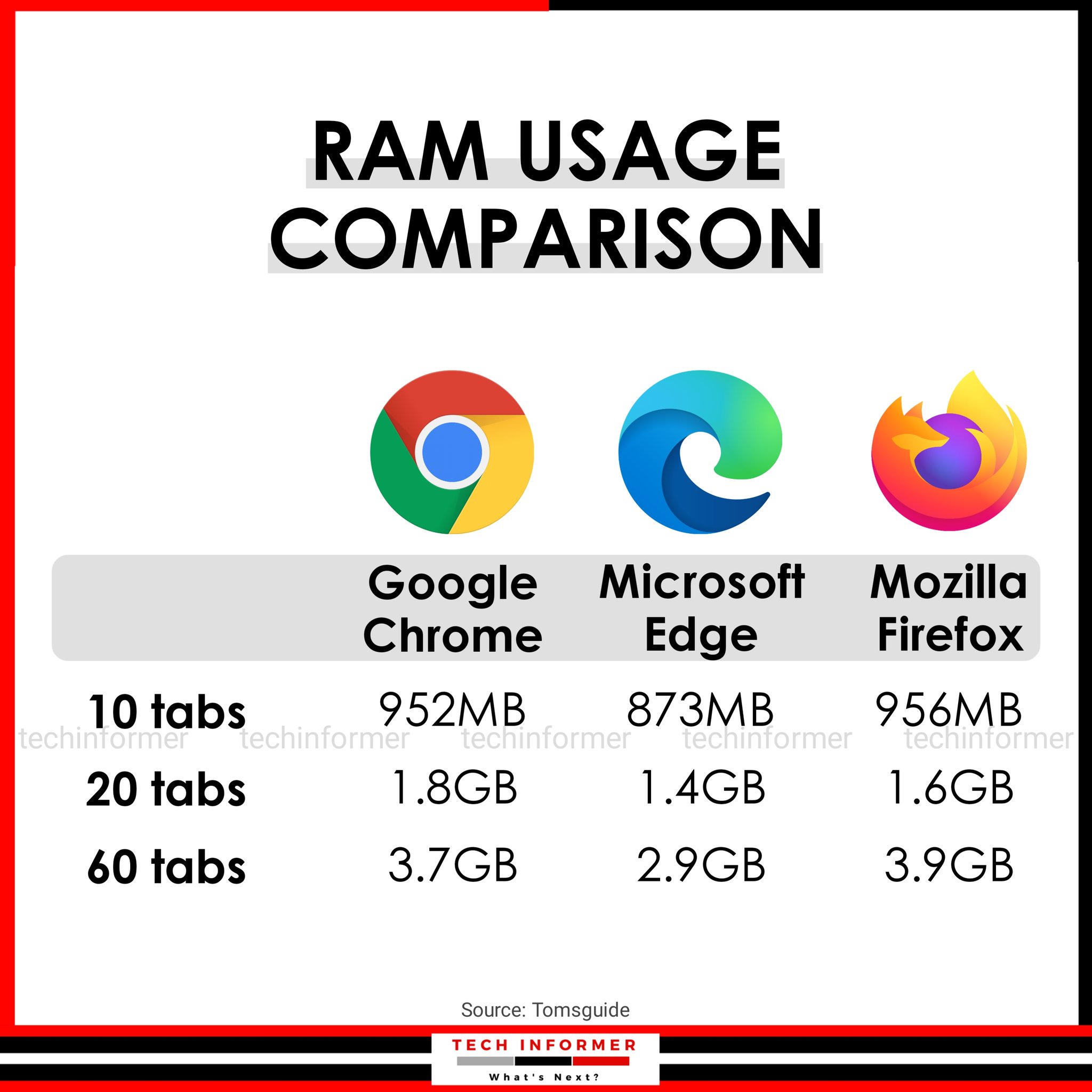
Chromeuses a lot of memory. It can slow down computers. Edgeuses less memory. It is better for older computers. Firefoxis known for good memory use. It balances performance and memory. Choosing a browser depends on your needs. Some prefer speed, others need less memory use.
Privacy And Security
Chrome offers basic tracking prevention. It blocks some trackers but not all. Edge provides three levels of tracking protection. It can block more trackers than Chrome. Firefox focuses on strong privacy. It blocks many trackers by default. Users can feel more secure with Firefox.
Chrome has a built-in malware scanner. It updates automatically to keep users safe. Edge includes SmartScreen. This feature warns users about harmful websites. Firefox has Enhanced Tracking Protection. It keeps users safe from unwanted tracking. All three browsers aim to protect users. But their features differ in strength and focus.
Extension And Add-ons
Extensions make browsers more fun. Chromeoffers a large library. You can find almost anything there. Edgealso has many options. It uses the same base as Chrome. So, many extensions work on both.
Firefoxis a bit different. It has its own add-ons. Some are unique and very useful. But not all Chrome extensions work here.
Compatibility is key for users. Chromeextensions work on most devices. This includes Windows, Mac, and Linux. Edgeis best with Windows. But it also works well on other systems.
Firefoxis known for its flexibility. It runs on many platforms. But some extensions may not work the same everywhere. Users should check before installing.
Cross-platform Support
Chrome offers seamless integration with Android devices. Users can access bookmarks and passwords easily. Edge works well with Windows phones and Android. It’s tied to Microsoft’s ecosystem. Firefox supports both Android and iOS. It offers a unique feature called Firefox Sync.
Chrome provides strong synchronization across desktops. Everything stays updated automatically. Edge uses Microsoft’s Cloud for syncing. It is fast and reliable. Firefox allows syncing through Firefox accounts. Bookmarks, history, and tabs sync smoothly.
Unique Features
Chrome has a large library of extensions. These are little helpers for your browser. Edge offers a unique tool called Collections. It helps you save and organize web pages. Firefox has a handy tool called Pocket. It saves articles to read later. Each browser offers something special for users.
Chrome is known for its fast performance. It handles many tabs easily. Edge includes a Reading Mode. This makes reading easier by removing ads. Firefox offers Enhanced Tracking Protection. It keeps your data safe from trackers. These functions make browsing better and safer.
User Feedback And Reviews
Users often share mixed reviews about Chrome, Edge, and Firefox. Many praise Chrome for its speed and simplicity. Others highlight Edge’s seamless integration with Windows. Firefox wins hearts with its strong privacy features. Each browser has its own loyal fan base.
Pros And Cons
Users like Chrome for its speedand easy-to-usedesign. It has many extensionsthat help in daily tasks. But, it uses a lot of memoryon computers.
Edge is fastand integrates well with Windows. It has unique featureslike reading mode. Some users say it lacks extensionscompared to Chrome.
Firefox is known for its privacyfeatures. Users praise its customizationoptions. Yet, it might not be as fastas Chrome or Edge.
User Satisfaction
Many users find Chrome reliablefor daily browsing. Edge is gaining popularityamong Windows users. Firefox has a loyal fan basedue to privacy. Each browser has its own strengths.
Frequently Asked Questions
Which Browser Is Fastest In 2023?
In 2023, Chrome is considered the fastest browser. It excels in speed, performance, and efficiency. Edge offers competitive speed, especially with Microsoft integrations. Firefox is slightly slower but emphasizes privacy and customization, making it ideal for specific user preferences.
Is Firefox Better For Privacy Than Chrome?
Yes, Firefox is better for privacy than Chrome. Firefox focuses on user privacy with advanced tracking protection. It offers customizable privacy settings, unlike Chrome, which collects user data for Google services. For privacy-conscious users, Firefox is a preferable choice.
Does Edge Consume Less Ram Than Chrome?
Edge generally consumes less RAM than Chrome. Edge is optimized for Windows systems, offering efficient memory usage. Chrome can be resource-intensive, especially with multiple tabs. Users with limited resources often prefer Edge for its streamlined performance.
Can Chrome Extensions Work In Edge?
Yes, Chrome extensions can work in Edge. Edge supports Chromium-based extensions, allowing users to install from the Chrome Web Store. This compatibility enhances Edge’s functionality, making it versatile for users familiar with Chrome extensions.
Conclusion
Choosing the right browser depends on personal needs. Chrome offers a vast extension library. Edge boasts seamless integration with Windows. Firefox prioritizes privacy and customization. Each browser has strengths and weaknesses. Consider speed, security, and features. Test them to see which fits best.
Switching browsers is simple and risk-free. Stay updated with their latest versions. New features and improvements come regularly. Your browsing experience should be enjoyable and efficient. Make a choice that suits your daily tasks. Happy browsing!
Read More:
- Reusable Rocket Innovation News: Revolutionizing Space Travel
- Neurotechnology Startups Funding: Unlocking Innovation Potential
- Best EV Charging Networks USA: Top Picks for 2025
- Snapdragon Vs Mediatek Comparison: Ultimate Processor Showdown
- Elon Musk Neuralink Update: Revolutionizing Brain Technology
- Remote Work Productivity Analytics: Boost Efficiency Now
- Edge Computing Trends 2025: Revolutionizing Tomorrow
- Over-Ear Vs In-Ear Headphones: Which is Best?

