
Imagine transforming your coding experience with the help of AI. You might have heard of Github Copilot and ChatGPT, two powerful tools that promise to elevate your programming skills.
But which one should you choose? As you delve into this comparison, you’ll uncover the strengths and weaknesses of each, helping you make an informed decision that could revolutionize the way you code. This isn’t just about efficiency—it’s about unlocking your potential, saving precious time, and enhancing your creativity.
By the end of this article, you’ll have a clear understanding of how each tool can fit into your coding workflow and which one aligns best with your needs. Let’s explore how these AI companions could become your new coding allies.
Features Comparison
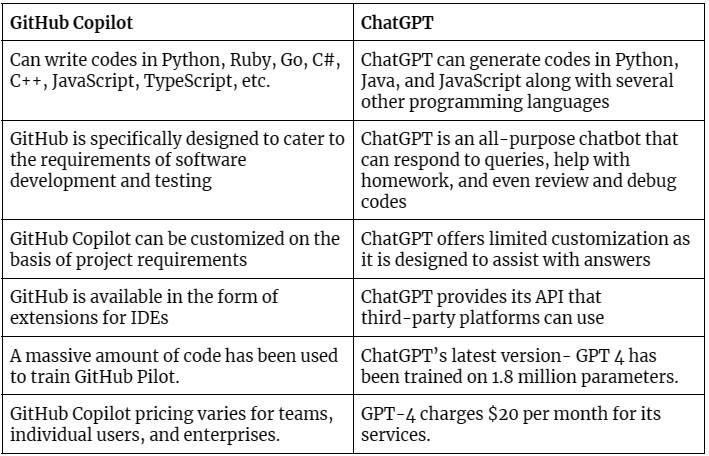
Github Copilotcan help write code faster. It suggests code as you type. This helps in getting the job done. Chatgptanswers code questions. It provides detailed code explanations. Each tool has its own use. Choose based on your need.
Github Copilotsupports many programming languages. Some popular ones include Python, JavaScript, and Ruby. It is versatile and helps many developers. Chatgptcan also work with many languages. It helps understand code in different languages. Both tools cover a lot of ground.
Github Copilotintegrates with Visual Studio Code. This makes it easy to use for coders. It fits well into the coding workflow. Chatgptis more flexible. It can be used through various platforms. Each has unique integration strengths.
Performance Analysis
Github Copilothelps write code quickly. It suggests code as you type. This saves time. ChatGPTis fast too. But it needs more input. It takes a bit longer. Both tools help speed up coding. But Copilot is quicker for short tasks.
Copilotmakes suggestions based on your code. It learns from real projects. This makes it accurate. ChatGPTalso gives suggestions. But it learns from general data. This means it sometimes makes mistakes. Copilotis better at understanding code context.
Copilotcan adapt to your coding style. It learns from your past work. This makes it more personal. ChatGPTtries to adapt too. But it’s not as focused on code style. Copilot feels like a coding partner. It grows with you.
User Experience
Github Copilotis like a helpful friend. It suggests code while you type. You see the suggestions right away. It’s easy and fast. ChatGPTis like asking questions to a smart person. You need to type questions. It gives answers in text format. Sometimes, it’s not direct. Both tools help in coding.
Using Github Copilotfeels simple. You can start using it quickly. It acts like code magic. Some people may need practice. ChatGPTrequires some patience. You must learn how to ask questions. Understanding responses takes time. Both tools need some learning.
People like Github Copilotfor its speed. It saves time. Many users find it useful. ChatGPThas mixed reviews. Some find it helpful. Others think it’s too complex. Feedback varies. Both have fans.
Use Cases
GitHub Copilot helps beginners write code easily. It gives suggestions and completes code while typing. This makes learning to code less scary. ChatGPT can answer coding questions in simple language. It explains things step by step. Both tools support new learners. They make coding fun and easy.
For complex tasks, GitHub Copilot offers smart suggestions. It saves time by reducing manual coding. ChatGPT helps by explaining complex concepts. It can suggest different approaches to solve problems. Experts can use both tools for effective coding. They help in getting better results.
Team projects need collaboration. GitHub Copilot assists by suggesting code that fits team standards. It improves coding consistency. ChatGPT can help in understanding team queries. It aids in better communication. Both tools boost teamwork. They ensure smooth project progress.
Pricing And Accessibility
GitHub Copilot offers a monthly and yearly plan. ChatGPT has a free tier and a paid version, known as ChatGPT Plus. Copilot’s plans have different prices based on usage. ChatGPT Plus is a single monthly fee. Both have trial periods for users to test features.
Copilot has limited free features for students. ChatGPT provides basic features for free. Paid versions unlock advanced tools and support. Free tiers are good for simple tasks. Paid tiers offer more powerful functions for professionals.
Copilot requires a GitHub account. ChatGPT needs a simple sign-up. Both require internet access. Copilot users need integration with code editors. ChatGPT works in browsers. Users must have a good connection for smooth use.
Future Developments
GitHub Copilot and ChatGPT are tools that help with coding. Developers wonder which will lead in future advancements. Both offer unique features and assist coders in different ways.
Upcoming Features
Github Copilot and ChatGPT are always getting better. Developers are adding new features. Github Copilot may soon help with more languages. ChatGPT could offer better coding support. Both tools aim to make coding easier. Expect them to offer more smart suggestions. They will likely get faster and more accurate.
Long-term Vision
Both tools have a big future. Github Copilot wants to be a coder’s best friend. ChatGPT aims to chat with coders smarter. They both want to make coding fun and easy. Their goal is to help coders solve problems quickly. They hope to make coding simple for everyone.
Impact On Coding Practices
These tools can change how we code. Github Copilot can speed up coding work. ChatGPT can help understand coding questions. Coders might use these tools daily. They help with writing clean code. Coders will learn to trust these tools. They make coding less stressful.
Frequently Asked Questions
What Is Github Copilot?
GitHub Copilot is an AI-powered code completion tool developed by GitHub and OpenAI. It assists developers by suggesting code snippets and auto-completing lines, enhancing productivity. Integrated into Visual Studio Code, it supports multiple programming languages and learns from public code repositories, offering relevant suggestions to streamline coding tasks.
How Does Chatgpt Assist In Coding?
ChatGPT aids in coding by providing explanations, debugging tips, and code suggestions. It uses natural language processing to understand queries and offers human-like responses. While not as code-specific as GitHub Copilot, it can help with problem-solving and understanding coding concepts, making it a useful tool for developers.
Which Is Better For Beginners, Github Copilot Or Chatgpt?
For beginners, GitHub Copilot might be more helpful in writing code. It offers real-time suggestions and assists in learning syntax and coding patterns. ChatGPT, however, can help explain concepts and provide broader programming knowledge, complementing Copilot’s capabilities with explanations and advice.
Can Github Copilot Replace A Human Developer?
GitHub Copilot cannot replace a human developer. It enhances productivity by suggesting code but lacks the creativity and problem-solving skills of a human. Developers must review and refine its suggestions to ensure quality and accuracy. It acts as a supportive tool, not a replacement.
Conclusion
Choosing between GitHub Copilot and ChatGPT depends on your needs. Copilot excels in code completion tasks. It helps with quick suggestions. ChatGPT offers more conversational support. It assists with coding explanations. Both tools have unique strengths. Consider your coding style and preferences.
Evaluate which tool fits your workflow best. Try both to see their capabilities. Experimenting will reveal their effectiveness. Each has its advantages in different situations. Your choice should align with your coding goals.
Read More:
- Reusable Rocket Innovation News: Revolutionizing Space Travel
- Neurotechnology Startups Funding: Unlocking Innovation Potential
- Best EV Charging Networks USA: Top Picks for 2025
- Snapdragon Vs Mediatek Comparison: Ultimate Processor Showdown
- Elon Musk Neuralink Update: Revolutionizing Brain Technology
- Remote Work Productivity Analytics: Boost Efficiency Now
- Edge Computing Trends 2025: Revolutionizing Tomorrow
- Over-Ear Vs In-Ear Headphones: Which is Best?

